[转]php用户登录代码
一款讲得非常详细的登录代码,对php入门者有很大的帮助,有需要的朋友可以免费查看。
效果图。
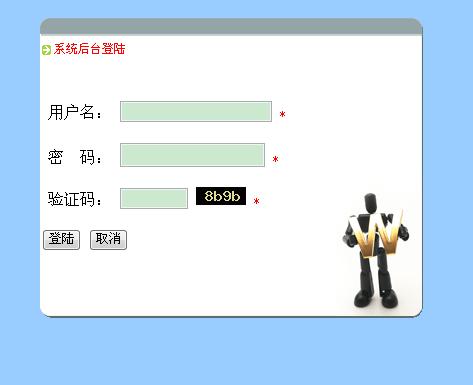
index.php
<!DOCTYPE html> <html xmlns="http://www.w3.org/1999/xhtml"> <head> <meta http-equiv="Content-Type" content="text/html; charset=gbk" /> <title>系统登录</title> <link href="css.css" rel="stylesheet" type="text/css" /> </head> <body> <div id="box"> <div id="denglu"> <div id="pic"> 系统后台登陆</div> <form action="check.php" method="post"> <p>用户名: <input type="text" name="name" id="name" /> <span class="must">*</span></p> <p>密 码: <input name="password" type="password" id="password" /> <span class="must">*</span></p> <p>验证码: <input name="check" type="text" id="check" size="8" /> <img src="piccheck.php" /> <span class="must">*</span></p> <p class="form_button"> <input type="submit" name="sub" id="sub" value="登陆" /> <input type="reset" name="unsub" id="unsub" value="取消" /> </p> </form> </div> </div> </body> </html>
数据库教程连接 connect.php
<?php
$connect = mysql_connect("localhost", "root", "") or die("服务器连接失败");
mysql_select_db("test", $connect) or die("没有建立相应的数据库");
$sql = "select * from admin";
?>
图片验证码 piccheck.php
<?php
/*
 * Created on 2011-8-10
 *
 * To change the template for this generated file go to
 * Window - Preferences - PHPeclipse - PHP - Code Templates
*/
session_start();
$code = rand(0, 9) . dechex(rand(10, 15)) . rand(0, 9) . dechex(rand(10, 15));
$_SESSION[pic] = $code;
$image = imagecreatetruecolor(50, 18);
$color = imagecolorallocate($image, 0, 0, 0); //第一次使用调色板,会设为背景颜色
$colortext = imagecolorallocate($image, rand(100, 255) , rand(100, 255) , rand(100, 255));
imagestring($image, 10, rand(1, 15) , rand(1, 5) , $code, $colortext);
imagegif($image);
?>
css.css文件
@charset utf-8;
body
{
    background-color:#9CF;
    text-align:left;
}
#denglu
{
    width:400px;
    background-image:url(images/login.gif);
    background-repeat:no-repeat;
    height:320px;
    text-indent:6px;
    margin:0 auto;
}
#box #denglu form
{
    position:relative;
    top:50px;
    left:10px;
    width:92%;
}
.must
{
    color:red;
    font-size:12px;
}
#box #denglu #pic
{
    background-image:url(images/dot1.gif);
    background-repeat:no-repeat;
    height:20px;
    width:100px;
    font-size:12px;
    color:red;
    text-align:left;
    line-height:18px;
    left:10px;
    top:30px;
    position:relative;
} 本文地址:http://www.phprm.com/base/40032.html
转载随意,但请附上文章地址:-)